RGB Mixer – Processing to Arduino

It has been a long time since I wanted to control the arduino with processing and I tried a lot of libraries, and a lot of processes and I always felt that none of those were suited for what I needed. I needed something simple to implement and easy to understand, and because I am not a programmer, I asked for help and @pauloricca replied to me with a quick, fast and really good solution.

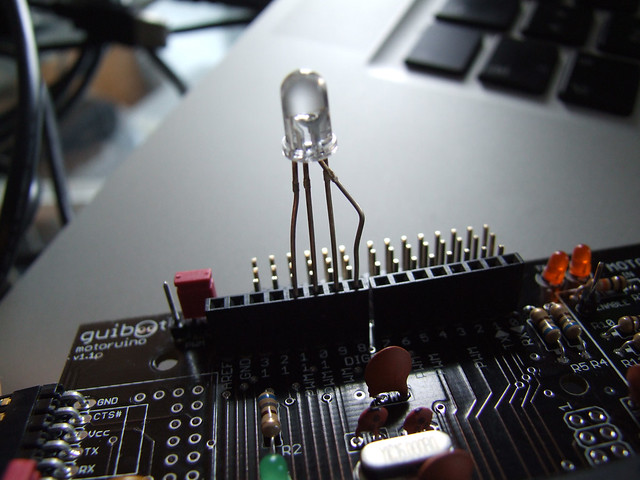
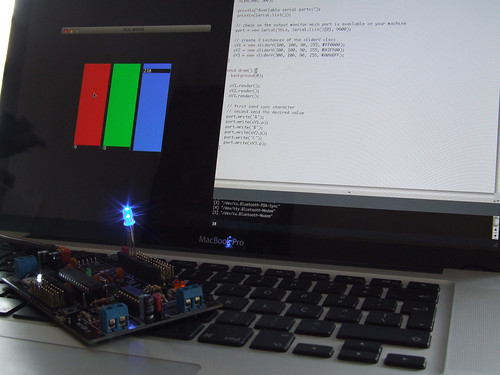
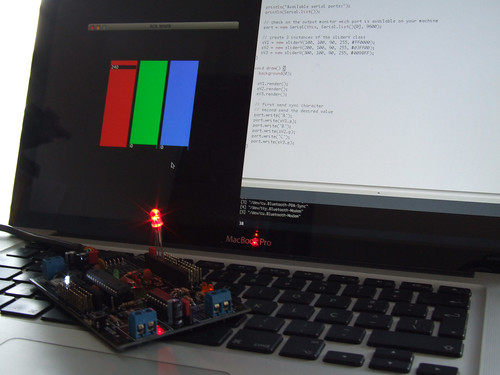
In this example I have connected an RGB LED to the Arduino and on Processing we will have a simple mixer to fade in and out color channels. DON’T DO THIS, LED’s always need to have one resistor in series before. In this case I just wanted to show the serial communication part, and I skipped the resistor part, lazy me! Never do this, otherwise you will kill your leds very fast.
RGB Mixer - Processing to Arduino

On the Arduino side, I defined 3 digital output pins 9, 10, 11, these are PWM capable pins. Than I defined pin 8 as an OUTPUT, and digitallyWrite it to LOW, to be the GROUND pin. On the loop() function we used a switch() function that detects when the sync characters ’R’, ‘G’ and ‘B’ are received. These characters will tell us what value is coming next. The function GetFromSerial() is called everytime we need to read a value from the serial port.

void setup()
{
  // declare the serial comm at 9600 baud rate
  Serial.begin(9600);

  // output pins
  pinMode(9, OUTPUT); // red
  pinMode(10, OUTPUT); // green
  pinMode(11, OUTPUT); // blue

  // another output pin o be used as GROUND 
  pinMode(8, OUTPUT); // ground
  digitalWrite(8, LOW);
}

void loop()
{
  // call the returned value from GetFromSerial() function
  switch(GetFromSerial())
  {
  case 'R':
    analogWrite(9, GetFromSerial());
    break;
  case 'G':
    analogWrite(11, GetFromSerial());
    break;
  case 'B':
    analogWrite(10, GetFromSerial());
    break;

  }
}

// read the serial port
int GetFromSerial()
{
  while (Serial.available()<=0) {
  }
  return Serial.read();
}

On the Processing side, I am using a slider class adapted from anthonymatox.com, and I created 3 instances of this class (I assume you understand the concept of class). The important thing to understand here is the import of the Serial library, and the creation of a Serial object called “port”. On the setup() function I print out the available serial ports and than I defined which one is the Arduino port, on my case is the number 0, note that I am using mac, if you are using PC it should be COM1, COM2 or another COM#. Finally I am passing the values of the slider after I pass the sync character ‘R’, ‘G’, ‘B’.

RGB Mixer - Processing to Arduino

import processing.serial.*;
Serial port;

sliderV sV1, sV2, sV3;

color cor;

void setup() {
  size(500, 500);

  println("Available serial ports:");
  println(Serial.list());

  // check on the output monitor wich port is available on your machine
  port = new Serial(this, Serial.list()[0], 9600);

  // create 3 instances of the sliderV class
  sV1 = new sliderV(100, 100, 90, 255, #FF0000);
  sV2 = new sliderV(200, 100, 90, 255, #03FF00);
  sV3 = new sliderV(300, 100, 90, 255, #009BFF);
}

void draw() {
  background(0);

  sV1.render();
  sV2.render();
  sV3.render();

  // send sync character
  // send the desired value
  port.write('R');
  port.write(sV1.p);
  port.write('G');
  port.write(sV2.p);
  port.write('B');
  port.write(sV3.p);
}

/* 
Slider Class - www.guilhermemartins.net
based on www.anthonymattox.com slider class
*/
class sliderV {
  int x, y, w, h, p;
  color cor;
  boolean slide;

  sliderV (int _x, int _y, int _w, int _h, color _cor) {
    x = _x;
    y = _y;
    w = _w;
    h = _h;
    p = 90;
    cor = _cor;
    slide = true;
  }

  void render() {
    fill(cor);
    rect(x-1, y-4, w, h+10);
    noStroke();
    fill(0);
    rect(x, h-p+y-5, w-2, 13);
    fill(255);
    text(p, x+2, h-p+y+6);

    if (slide==true && mousePressed==true && mouseX<x+w && mouseX>x){
     if ((mouseY<=y+h+150) && (mouseY>=y-150)) {
        p = h-(mouseY-y);
        if (p<0) {
          p=0;
        }
        else if (p>h) {
          p=h;
        }
      }
    }
  }
}
RGB Mixer - Processing to Arduino

RGB Mixer - Processing to Arduino

RGB Mixer - Processing to Arduino

ICU . I See You

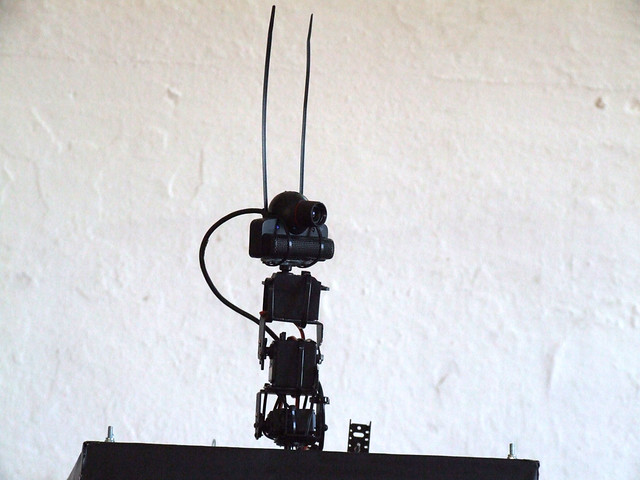
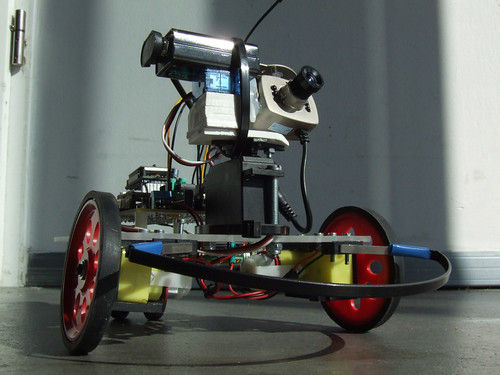
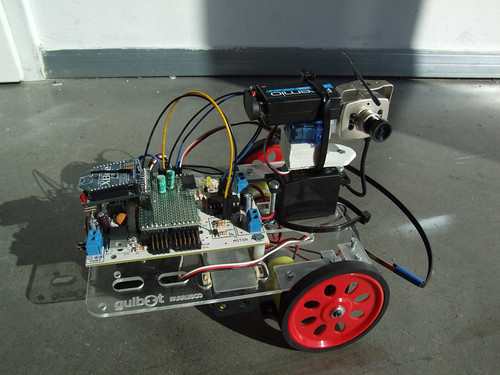
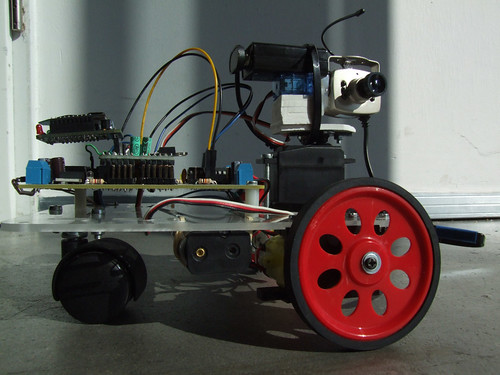
ICU is a sub-project of the SWARS (see what a robot sees) project.

This time I not just wanted to see what a robot sees, but I also wanted to give the robot the ability to understand that there is a person in the room, and stare at the person.

To detect faces I used the OPENCV library for Processing, wich turns out to be very fun to work with and is very sensitive to human faces.. and sometimes it detect faces where there aren’t any.. maybe it is a ghost face detector algorythm!!

I didn’t have time to work with the four motors, I am only working with the two servo motors on the top. Next step will be to apply inverse kinematics and have a better level of interactivity.

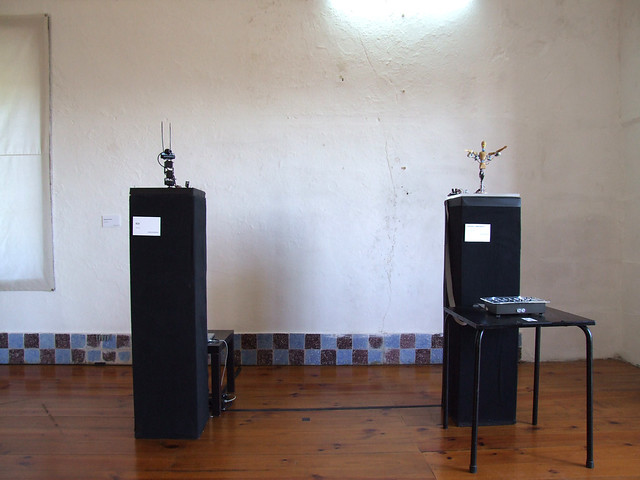
Unfortunately I had to pick the computer that was being used in this installation, I will need it in the next weeks, but this bot will be available to the public very soon I promise!!

This is the code I am using if someone wants to look at it, you will need to have the MegaServo library installed for the Arduino sketch, and the OPENCV lib for the Processing sketch.

3 new paperduinos

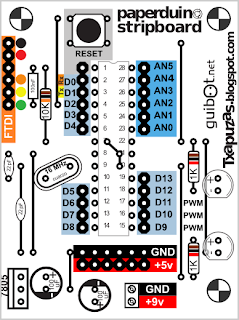
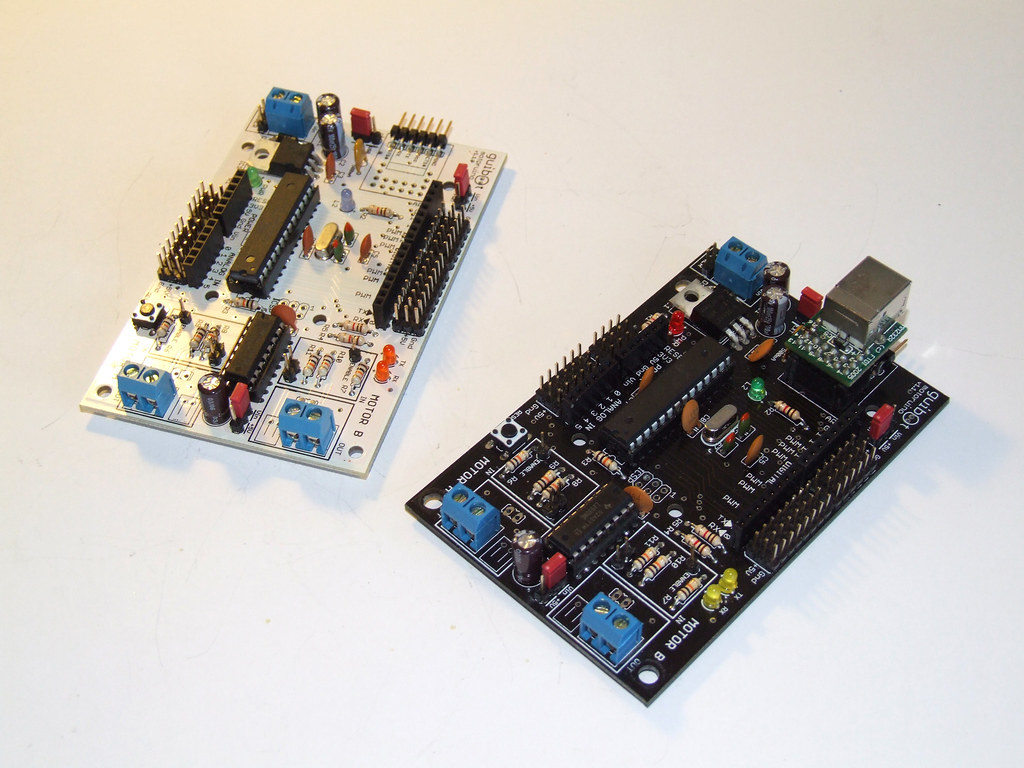
This time “txapuzas” presented us with 3 new derivations of the Paperduino, one on a perfboard, other on a pcb, and another on a stripboard pcb. I totally love them all, specially the pcb version ready to be etched.

All versions are very well documented and I totally want to try them all.

Paperduino on a perfurated board:

Paperduino on a stripboard pcb:


And finally on an etched pcb (my favourite):

AZLabs @ O Espaço do Tempo

Audiencia Zero – Exposicao
LCD + AltLab + xDA Portugal
12 a 31 julho 2010
Convento da Saudacao | Montemor-o-Novo

Mostra de trabalhos e projectos de arte digital e multimédia dos laboratórios Audiência Zero : AltLab (Lisboa), LCD (Matosinhos) e xDA (Coimbra).

A Audiência Zero é uma associação cultural criada em 2006 com o objectivo de combater a dispersão de pessoas e meios, formar públicos para a cultura e abraçar a Internet e as novas tecnologias como plataformas para o avanço da cultura.

Desde 2008 a associação tem desenvolvido um projecto de formação denominado Centro de Criatividade e Tecnologia através do qual organiza cursos e workshops relacionados com a aplicação criativa da tecnologia com ênfase especial em ferramentas livres e open source que fomentam a partilha livre de conhecimento.

Da actividade deste projecto surgiu a necessidade de haver um espaço informal onde as pessoas que começam a aprender a usar a tecnologia para fins criativos se pudessem encontrar para continuar a sua aprendizagem partilharem conhecimento e experiências e desenvolver projectos em conjunto. Foi assim que nasceu o projecto dos Laboratórios Audiência Zero, que no espaço de dois anos cresceu de um para três espaços a nivel nacional, o Altlab em Lisboa, o LCD – Laboratório de Criação Digital no Porto e o xDA – Atelier de Experimentação Digital em Coimbra.
Hoje em dia estes espaços servem como ponto de encontro regular para uma nova geração de criadores, artistas e não só, ligados numa rede a nivel nacional­, sem medo de se apropriarem da tecnologia e do conhecimento para pôr em prática as suas ideias num ambiente de partilha e experimentação livre.

Esta exposição apresenta os resultados de uma experiência única. Durante 17 dias, 30 membros dos Laboratórios Audiência Zero de todo o país e do estrangeiro viveram e trabalharam juntos em projectos colectivos. Formaram-se novas equipas­, surgiram infinitas ideias, experimentaram-se novas ferramentas e tecnologias, viveram-se peripécias incríveis e fizeram-se novos amigos. Os projectos patentes nesta exposição apenas a ponta do véu, verdadeiro impacto desta experiência ainda está para vir.

LOCAL GEOGRAPHIC

RUI HORTA – LOCAL GEOGRAPHIC

Local Geographic, Rui Horta’s third and last creation while Associate Artist of the Season, is a reflection on identity, a study of a “personal geography “, using the body as a tool to discover the world.

11, 12 and 14 May 2010 – 9:00 PM
15 and 16 May 2010 – 7:00 PM
12 years and up

A work about the importance of loosing oneself; on turning loss in a method, especially when life experience tends to become a burden that prevent us to take risks. Loss, though as a method.

Every week, I was used to pick up my bike to discover a new trail and a new landscape. Usually, I set out early morning and returned before my day really began. It was like a prologue to an announced routine. Sometimes I lost myself…

There are people who go to Namibia or to Tibet to lose them (and spend a great deal of money …). And there are those who lose just around the corner, almost next to the doorway. For any creator doubt, loss and risk are the very substance of work, coexisting everyday: research and experimentation.

Somehow, from the three works I created to the CCB as associate artist of the current season, this one is the most narrative and also the most personal. A discourse on the quest for identity, in the opposite of plausible, at the border of irony. It could only be done by me and for myself or for a performer with whom I have been sharing a multitude of creative adventures over eighteen years, Anton Skrzypiciel. Many-sided actor/dancer/performer, a man so curious about live that he never tied anchor in any harbour, a major actor in one of the most important works I created.

This is a work accompanied by one of my usual accomplices, composer Tiago Cerqueira, actor/stage director Tiago Rodrigues and multimedia designer Guilherme Martins.

Direction | Choreography | Lighting RUI HORTA
Original Soundtrack TIAGO CERQUEIRA
Texts RUI HORTA | TIAGO RODRIGUES
Interpretation ANTON SKRZYPICIEL
Vídeo GUILHERME MARTINS
Dramaturgy Support TIAGO RODRIGUES
Technical Direction NUNO BORDA DE ÁGUA
Production ANA CARINA PAULINO

CO-PRODUCTION
CCB | O Espaço do Tempo | Centro Cultural Vila Flor | Teatro Nacional S. João

CCB ASSOCIATED ARTIST SEASON 2009-2010

SWARS – See What a Robot Sees

This project is a collection of experiences related to seeing and percieving the world from the point of view of robotic creatures. Robots will send sensor data to the computer and will generate visual and audio landscapes in real time.

The development started during the Audiencia Zero residency in O Espaço do Tempo in Montemor-o-Novo, and will continue until the final exhibition wich will be in July.

This is a colaborative project where many friends are bringing together their skills, until now we have collaborated with:
– Pedro Ângelo with Serial Communication;
Rui Madeira with computer vision technics and advanced maths;
Sérgio Ferreira is a media and interaction guru, always providing precious help and advice;
– Daniel Gomes is working on a MAXMSP interactive sound;
Nuno Morgadinho is developing an online application to remotely control robots.
– André Almeida is a computational guru and a great technology and interaction advisor.

More to come ;)

Sub-projects list:

ICU – I See You

This is the first iteration of this project, and just a quick test for something greater.. hope to have time for it in the future.

Components list:
Motoruino (Arduino compatible board) up and running;
– Wireless camera and video converter sponsored by O Espaço do Tempo;
– Basic pan/tilt system built with PVC;
– GUI written in Processing enabling robot remote control, gives vision feedback and servos orientation.

SOURCE CODE FOR ARDUINO AND PROCESSING

+ 4’33” (Tributo a John Cage)

Terça | 23 Março 2010
19:30, Sala Suggia
+ 4’33” (Tributo a John Cage)

John Cage chocou o mundo quando em 1952 apresentou a sua peça para qualquer instrumento solista ou grupo instrumental na qual os músicos permanecem em silêncio absoluto durante 4 minutos e 33 segundos. No total, são três andamentos de silêncio com durações diferentes que questionam o conceito da audição musical e do próprio concerto na tradição ocidental.
A Casa da Música e o IRCAM-Centre Pompidou encomendaram a diversos compositores + 4’33”, uma homenagem ao compositor norte-americano que resulta em novas obras com igual duração apresentadas no Porto em estreia mundial.

REMIX ENSEMBLE
Peter Rundel direcção musical
Rui Horta direcção cénica, desenho de luz e multimédia
Guilherme Martins visuais
Maxime Le Saux engenheiro de som IRCAM
Martin Antiphon técnico de som IRCAM
Roque Rivas realização informática musical IRCAMJohn Cage Sixteen Dances
Carlos Caires All-in-one, para ensemble e electrónica*
Roque Rivas About Cages, assemblage para piano, ensemble e electrónica**
Bruno Mantovani …273…*
John Cage/Christian Marclay (adaptação) 4’33”*
James Dillon Torii *

* (estreia mundial; encomendas da Casa da Música e IRCAM-Centre Pompidou)
** (estreia mundial; encomenda do IRCAM-Centre Pompidou)

(Co-produção Casa da Música, Festival Musica de Estrasburgo, IRCAM/Les spectacles vivants – Centre Pompidou e Ars Musica de Bruxelas no âmbito do Réseau Varèse: subvencionado pelo Programa Cultura 2000 da União Europeia)

Transmissão em directo em http://www.casadamusica.tv/