This is Zezinho, a humanoid robot that likes to pose! :)

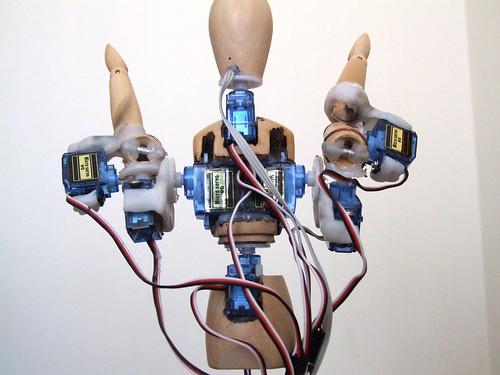
All the microservo supports where made with the amazing material Polymorph.
For now he is being controlled by 8 analog inputs, each input controls one microservo. In the future (as I hope) he will be controlled by a computer vision system where he will try copy real human poses in real time.
I’m still programming servo control functions and movements presets.
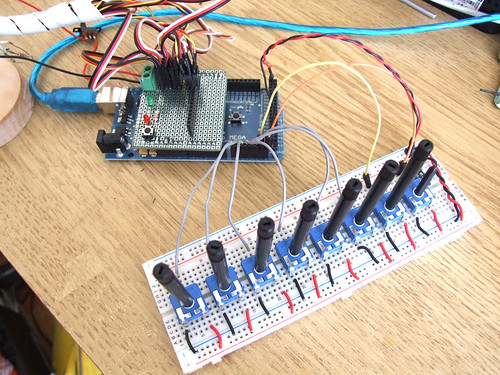
This is the analog inputs setup and a custom servo shield.
I’m using an Arduino Mega because I need more than 6 analog inputs that the regular Arduino boards have and I don’t have the time (or should I say patience) to digg around multiplexers.. I’m very lucky to have the support of InMotion.pt, they sent me the Arduino Mega for the first test drive. Thank you so much Filipe!! ;)
This robot will also be my final project for the course ‘O Som do Pensamento’. It will be an instalation where the user will be able to control his poses with physical controllers. I’ve made a controller box in acrylic and will post photos as soon as I have it with me.
Playing with movements and poses.
Testing movements and different servo speeds.
________________________________________________________________
Update (21.08.09)
Other posts related to Zezinho:
Experimental video made for OddBot robot competition:
http://lab.guilhermemartins.net/zezinho-meets-el-sapatero/
Zezinho, the Poser interactive installation:
http://lab.guilhermemartins.net/zezinho-the-poser-installation/
Filtering servo movements:
http://lab.guilhermemartins.net/filtering-servo-movements/
Greetings,
Nice work ;)
Where can i find some Polymorph for sell ? Any shop here in portugal ?
Where do you buy yours ?
Thanks
Hi! I usually buy polymorph here: http://www.mutr.co.uk/product_info.php?products_id=550
One kilogram gives you a lot to play with ;)
I’m in love with this project!
Its really cool!
Is there any way to make it with regular arduino?
Can you share the code? So i don’t need to do it from scratch.
Thanks!
The reason I am using an Arduino Mega is because I need more than 6 analog inputs.
The code will be released as soon as the project is finished.
Hi, do you think its possible to share this code? I Will start making a project like this one.
Thanks !
All you have todo is, for each articulation/servo motor:
Read an analog value, (potenciometer, slider, sensor) analog values range from 0 to 1023.
Assign each analog value to a servo, servo motors move from 0 to 180º, and because of this you need to map the analog value (0 to 1023) to the servo value (0 to 180).
something like this:
sensorValue = analogRead(0);
desiredAngle = map(sensorValue, 0, 1023, 10, 170);
servo.write(desiredAngle);
Yes, that part its ok, but how about the code to make the movements more smooth?
thanks
http://lab.guilhermemartins.net/2009/08/21/filtering-servo-movements/